
Verdict: Kling AI produced the best single Short in our free-tier test — the only clip that performed the whole story we asked for. But the free plan gave us 66 credits for the month, and one clip cost 50. It is a monthly taster, not a channel supply.
Best for: Creators who want one standout clip a month, and can wait out a long free queue.
Not for: Daily posters, or anyone who needs commercially usable clips from a free plan.
Kling appears in almost every "best AI video generator" list, usually near the top. In our 7-tool free-tier test it earned that reputation: its clip scored 4 out of 5 for prompt accuracy, the highest we gave. This guide is everything we learned from our single free generation on October 31, 2026 — how the generation actually went, what the free plan really gives you, and the limits the listicles skip.
What Kling is
Kling AI is a text-to-video generator: you describe a shot in words, and it renders a short clip. In our free test account, the default model was Kling 4.0 — newer than we expected to get for free; older models were disabled in text-to-video.
The free plan, as we measured it
Free-plan numbers move fast, so here is our account exactly as it stood on October 31, 2026:
- 66 free credits per month. Our account ledger literally reads "Free monthly credits", credited on October 31, 2026 and expiring December 1, 2026.
- One clip cost 50 credits — leaving 16.
- Free queue: about 19 minutes for a single 5-second generation.
- Output: 720 × 1280, 5.04 seconds, with an audio track.
- Watermark: "KlingAI 4.0", burned into the bottom-right of the frame.
One warning, because it is the trap in most older guides: you will still read that Kling gives "66 credits per day". That is not what our account shows. The daily bonus is now a subscriber perk; for a free account, the 66 credits are monthly. Plan around the ledger, not the listicles.
How our one generation went
We used the same prompt as every tool in our test — one generation, no rerolls:
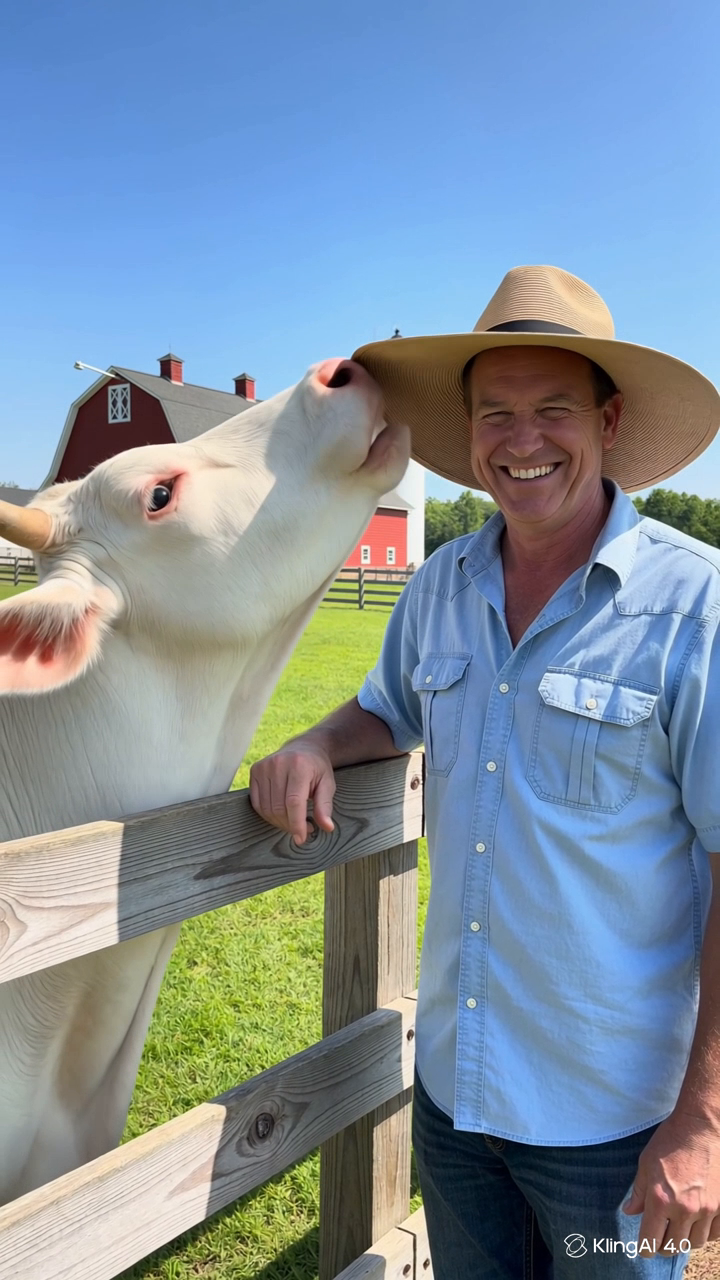
Vertical 9:16 video, realistic handheld phone footage on a sunny farm: a white cow stretches its neck over a wooden fence and steals the straw hat off a laughing farmer's head, then trots away proudly wearing it. Natural farm sounds, one continuous shot, playful mood, no text.
- Paste the prompt into the text-to-video composer.
- Set the format: Kling 4.0, 720p, 5 seconds, aspect ratio 9:16.
- Submit and wait. The free queue took about 19 minutes in total; the on-screen estimate swung from 14 up to 37 and back down to 2 minutes along the way. We used no paid boost.
- Download and check the file. Measured after download: 720 × 1280, 5.04 seconds, about 9.8 MB, with an audio track — and the "KlingAI 4.0" watermark in the corner.
What it did better than the others
Our prompt hides four beats, in order: the cow reaches over the fence, the hat leaves the farmer's head, the farmer reacts, the cow leaves wearing the hat. In the same prompt run through five tools, the steal itself was the weakest beat almost everywhere — rival tools morphed it or skipped it. Kling showed it, fast but visible:
- The cow's nose touches the hat brim while the farmer is still wearing it.
- The farmer is hatless, hand on his head, laughing hard — the hat now on the cow behind the fence.
- The cow trots away across the field wearing the hat, the farmer watching.
All four beats, in order — the most complete telling of the story in our test. It is not flawless: the grab happens quickly inside the 5 seconds, and in the middle frame the hat sits awkwardly behind the cow's horns. But for a one-action gag with a clear ending, this was the clip we would have published first.
The honest limits
- The maths is brutal. 66 credits a month, 50 credits a clip: after one generation you have 16 left — not enough for a second 50-credit clip. The free plan is roughly one clip a month.
- The watermark stays. Every free output we produced carries "KlingAI 4.0" in the frame.
- Commercial use is barred on free terms. Kling's terms (ToS §4.6) do not allow commercial use of outputs without written permission — so a monetised channel cannot treat free clips as cleared to publish for revenue.
- The queue is slow. About 19 minutes for 5 seconds of video. Fine for one planned clip; painful for experimenting.
Who should use it — and who should not
Save Kling for the hero idea. If you have one concept a month where the action absolutely has to land — the gag your whole week of posting builds toward — this is where the free plan earns its keep. Our advice: prove the idea cheaply first with a daily-refill tool, then spend Kling's 50 credits on the prompt you already know works.
Daily posters should look elsewhere. One clip a month cannot feed a channel, however good the clip is. Our Google Flow beginner workflow covers the free plan we actually run a daily routine on — Kling is the monthly treat alongside it, not a replacement for it.
Testing note: Written from one hands-on generation on a free Kling AI account on October 31, 2026 — Kling 4.0, 720p, 5 seconds, 9:16; the account ledger showed 66 monthly free credits, 50 were spent, no rerolls; the downloaded file was measured after generation. Credit amounts, queue times and terms are as shown on that date and can change. This post contains no affiliate links.
Comments
Post a Comment