
Verdict: AI Shorts rarely look fake because the model is weak. They look fake at the joins: the action that never happens, the grab that morphs, the extra who vanishes. Every failure below is ours, and every fix is the rule we took from it.
Based on: Four hands-on generations, October 31 – November 1, 2026: one identical prompt in Google Flow, Kling AI and PixVerse, plus one simpler Flow Lite clip. A small sample, honestly labelled.
When a viewer scrolls past an AI Short in half a second, it is rarely the resolution that betrayed it. It is a moment that feels wrong — an object teleports, a person is suddenly not there. We know these moments well, because we manufactured them. For our 7-tool free-tier test, we ran one identical prompt — a cow stealing a farmer's hat — through every tool that would generate it, no rerolls. The scores are in the same Short made in five tools; this is the other half of that experiment: the failure catalogue, and the seven rules we now write prompts by.
First, the failures — all ours
Google Flow (Veo 3.1 Fast) — the action that never happened. Flow's clip opens well: the cow noses at the hat brim, the farmer laughs, and the cow trots off across the field wearing a hat. Watch closely and the steal itself is missing — the hat never actually leaves the farmer's head. The hat on the cow is effectively a second hat that appears — slightly smaller than the farmer's. The model delivered the start and end states and quietly skipped the event in between. We scored it 3 out of 5 for prompt accuracy — a flaw the channel owner caught watching the clip back.
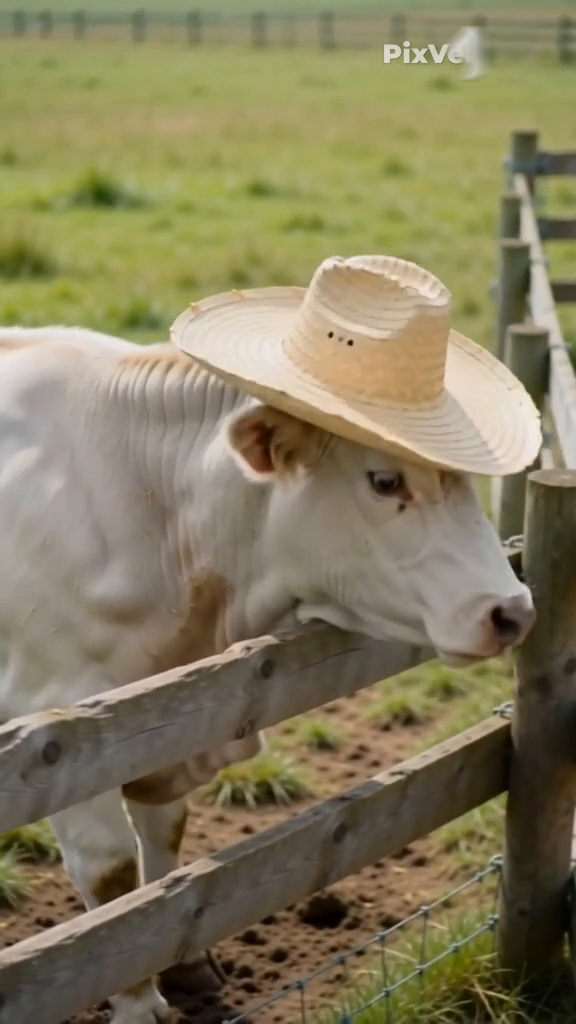
PixVerse (V6) — the morph and the vanishing farmer. PixVerse kept the outline — cow at the fence, hat on the cow at the end — but the steal is a morph, not a grab: one frame the hat is on the farmer, the next it is on the cow, with no moment where anything takes it. Then continuity frays: the farmer disappears from the later frames altogether, and a bucket that was never in our scene appears out of nowhere. And "PixVerse.ai" is burned into the top of every frame.
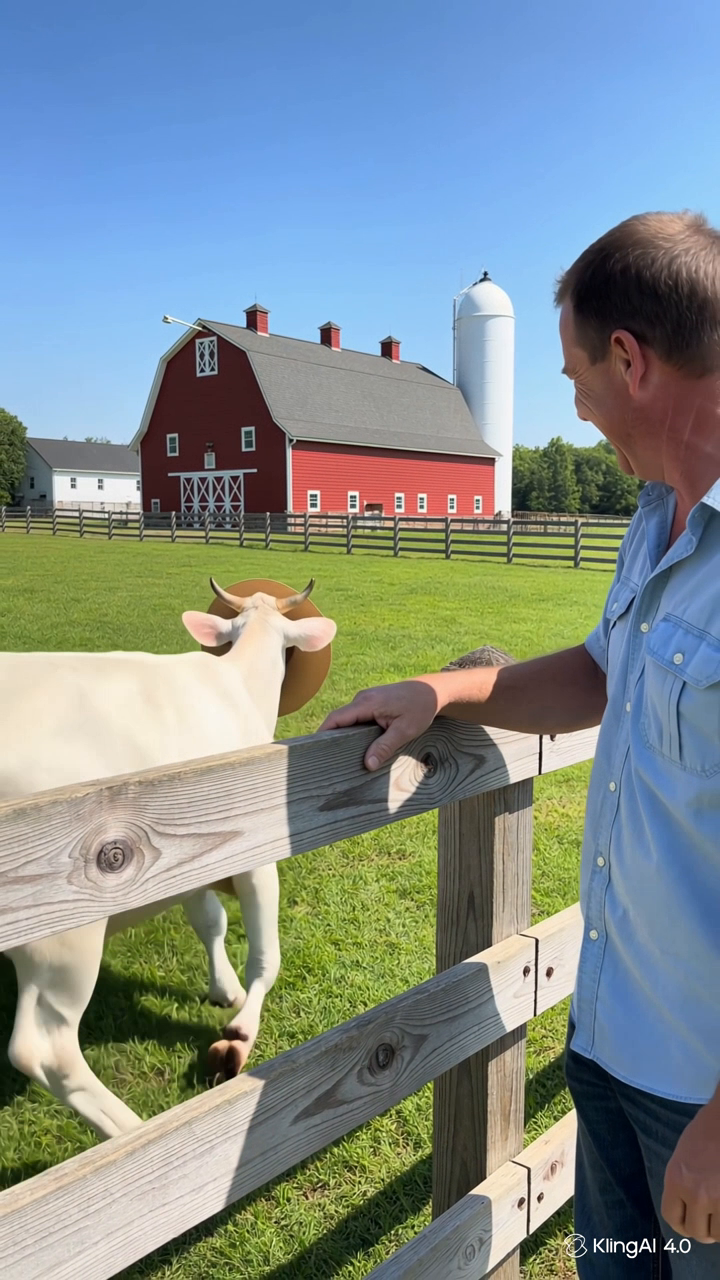
Kling AI (Kling 4.0) — the best clip, and still not clean. Kling was the only tool that performed all four beats in order, earning the highest prompt-accuracy score we gave: 4 out of 5. But the grab is very fast — blink and the hat has changed heads — and in the middle frame it sits awkwardly behind the cow's horns rather than on its head. Nothing here ruins the clip; all of it is the half-second wrongness viewers feel without naming.
The control case — a simpler prompt that worked. Our fourth generation was a smaller ask, in Veo 3.1 Lite: a baby goat hops onto a hay bale, tumbles into the loose hay and pops its head up at the camera. One subject, one action, one pay-off — and the clip followed the prompt closely. Same account, same weekend, cheaper model: the difference was not the tool, but the size of the ask.
The 7 fixes
Each fix is named after the failure that taught it. None needs a paid plan; all are prompt and planning decisions.
1. One action per clip. Our test prompt hid four beats — reach, steal, reaction, getaway — inside 5 to 8 seconds, and every tool stumbled on the middle ones. If your story has three actions, that is three clips. Shorts are built from single moments anyway; let the edit, not the model, do the storytelling.
2. Write the movement, not the result. "Steals the hat" describes an outcome, and Flow happily rendered the outcome — a cow in a hat — without the event. Describe the physical movement instead: stretches its neck over the fence, closes its mouth around the hat brim and lifts it off his head. A model can skip a result; a described movement has to be animated.
3. Keep the cast and the prop list tiny. PixVerse lost our farmer entirely and invented a bucket. Every character you name is something the model must track for the full clip — and free-tier models drop balls. One or two subjects, named props only, nothing decorative you cannot afford to see mutate.
4. Spend prompt words on the final frame. Across all three hat-steal clips, the ending state was the most reliable element — even Flow, which skipped the steal, nailed "cow wearing the hat." End states are what these models render best, so describe the last second precisely: who is where, wearing what, facing the camera or away.
5. Choose camera language that forgives flaws. Every test prompt we ran asked for "realistic handheld phone footage," and it matters: slight shake and natural light let a too-fast grab (Kling) or a soft transition read as footage, not a render error. A locked-off, cinematic shot holds every flaw still for inspection. We ran no controlled comparison, so treat this as a strong suspicion rather than a measured result — but it costs nothing to add the words.
6. Check the watermark before the motion. Two of our three completed clips came back with a brand name burned into the frame — "KlingAI 4.0" in the corner, "PixVerse.ai" across the top. No prompt fix repairs that. Know before you generate whether the free tier watermarks, and whether its terms even let you publish — both of those free tiers bar commercial use.
7. Prove the prompt cheap, then spend. Our Lite goat clip cost 10 Flow credits and followed its prompt more faithfully than the 20-credit Fast clip did. Kling's attempt cost 50 credits out of a 66-credit monthly allowance. The order of operations that protects you: draft and test the idea on the cheapest tier you have, fix the prompt there, and only then spend scarce credits on the hero version. Our 25 AI prompts for funny animal Shorts are written to be tested cheaply first, for this exact reason.
The short version
None of this requires a paid plan — just treat your first generations as evidence: watch frame by frame, name the exact moment it breaks, and turn that break into a rule. Our daily routine for doing it inside Flow's free credits is in the Google Flow beginner workflow.
Testing note: Written from our own hands-on generations on October 31 and November 1, 2026 — the identical hat-steal prompt run once each in Google Flow (Veo 3.1 Fast, 20 credits), Kling AI (Kling 4.0, 50 credits) and PixVerse (V6, 38 credits), plus one Veo 3.1 Lite generation (10 credits, the baby goat clip). No rerolls; files were measured and frames checked after generation. Four generations is a small sample — these are field notes from real failures, not lab results. Credit amounts and terms are as shown on those dates and can change. This post contains no affiliate links.
Comments
Post a Comment